Monday, 15 June 2020
MoveController plugin for Honey Select 2
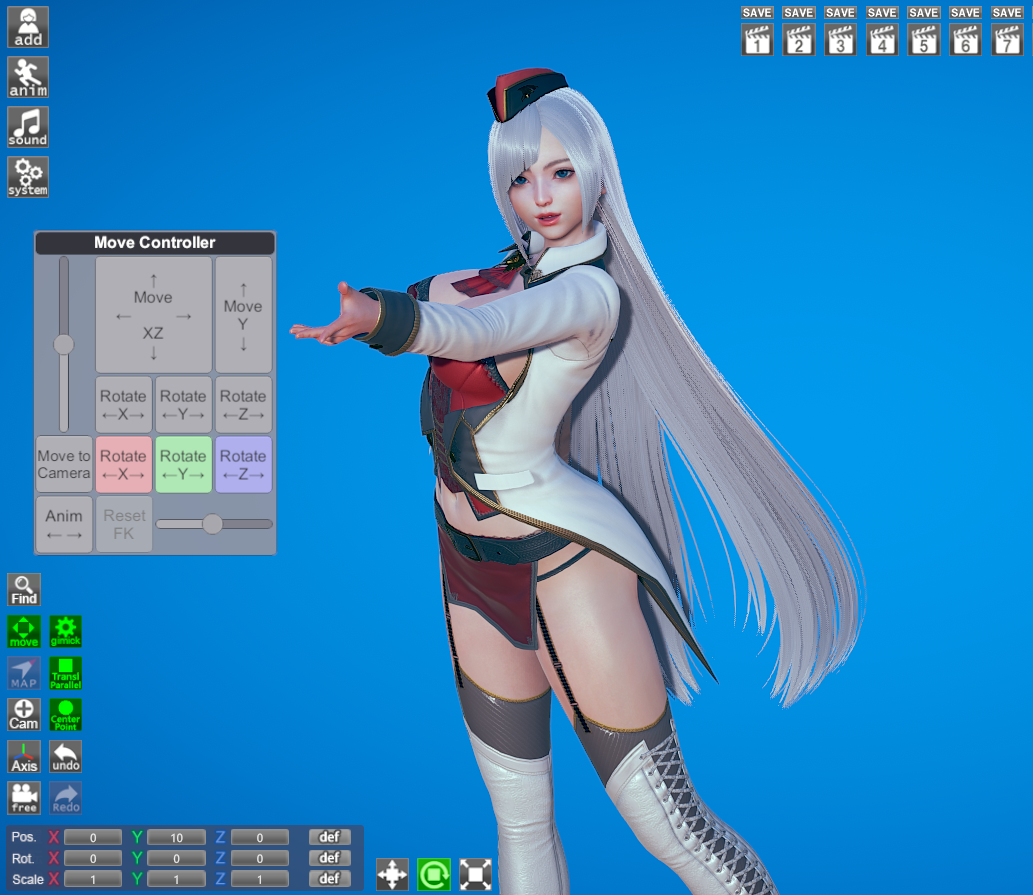
I've ported the MoveController to HS2 Studio NEOV2. It works the same as the AI girl version you can read about here.
Download here
Wednesday, 10 June 2020
Character Loader 1.0.2 for AI Girl and Honey Select 2
This small update to the Character Loader plugin fixes a bug that prevented the user from loading a character that was registered in-game.
Download for AI Girl
Download for Honey Select 2
Download for AI Girl
Download for Honey Select 2
Monday, 8 June 2020
Honey Select 2 Plugin Releases!
I've ported the PushUp, Beaver, Gravure and Character Loader plugins to Honey Select 2. They are pretty much identical to the AI Girl versions. The only exception is Gravure, which gets a new feature, the "< Animation >" control. Click and drag the mouse on this panel to advance or reverse the animation of the current pose. It's a nice way to find the exact pose you want for your shot in a long animation.
Like in AI Girl, the Character Loader only supports folders in the maker and studio. I'm hoping to add folder support for the main game in the next version of the plugin.
All of these plugins require BepInEx and HS2API. PushUp requires HS2ABMX.
Some of you may notice that most of the files are named "*AI.dll". It turns out that it's more trouble than it's worth to have different file names when you want to build the same plugin for different games, so to keep things simple I decided not to change any plugin file names. Think of it as paying respects to the historical origin of these plugins.
Downloads here
Like in AI Girl, the Character Loader only supports folders in the maker and studio. I'm hoping to add folder support for the main game in the next version of the plugin.
All of these plugins require BepInEx and HS2API. PushUp requires HS2ABMX.
Some of you may notice that most of the files are named "*AI.dll". It turns out that it's more trouble than it's worth to have different file names when you want to build the same plugin for different games, so to keep things simple I decided not to change any plugin file names. Think of it as paying respects to the historical origin of these plugins.
Downloads here
Thursday, 28 May 2020
Honey Select 2 is out!
Honey Select 2 has just been released, and as expected the character maker is pretty much identical to AI Girl, with some improvements and a bunch of cool new costumes.
When a modding API for HS2 is available I plan to port my AI Girl plugins to HS2, starting with the PushUp and Beaver plugins. Since the games have so much in common I hope it won't take much to get the plugins working in HS2.
Friday, 22 May 2020
Character Loader for AI Girl 1.0.1
This small update to the Character Loader plugin fixes a bug that caused a crash when trying to change characters in the main game. It also adds a config option to change how many character cards to display per row in the StudioNEOV2 character loader window.
Download here
Download here
Thursday, 14 May 2020
Character Loader plugin 1.0 for AI Girl
The Character Loader plugin adds a nice visual list of character cards to StudioNEO2. It lets you load characters from folders, and also organise variants of a character for easy access. Open this window by clicking the new "Characters" button in the "Add" menu. Full support for both males and females.
Use the new "Save Variant" button to save the character you are editing as a variant of the character selected in the list. It will be saved in the folder \Variants\<Character name> and appear in the Variants list in the studio window when you select that character.
Variants are organized by name, so if you have two characters with the same name they will share variants.
If you like this plugin and decide you don't need the default "Girls" and "Boys" menus anymore, there is a mod config option to remove them,

and make your Add menu look like this;

The plugin also adds a folder list to the character maker.
Use the new "Save Variant" button to save the character you are editing as a variant of the character selected in the list. It will be saved in the folder \Variants\<Character name> and appear in the Variants list in the studio window when you select that character.Variants are organized by name, so if you have two characters with the same name they will share variants.
If you like this plugin and decide you don't need the default "Girls" and "Boys" menus anymore, there is a mod config option to remove them,

and make your Add menu look like this;

EDIT: Download link to old version removed, get the latest one here!
Sunday, 10 May 2020
Subscribe to:
Posts (Atom)


